Project detail

Feedback Flow

Project detail

Feedback Flow

Project detail

Feedback Flow

Project Overview

Project Overview

Project Overview

FeedBackFlow is a personal project I designed and built to solve a problem I kept seeing in early-stage SaaS teams: customer feedback scattered across Slack, Intercom, and email, with no single place to make sense of it. The goal was to design a tool that collects signals from those sources, runs AI analysis on them, and gives product managers a clear picture of what users want, what's breaking, and what to build next.

The Challenge

The Challenge

The core problem wasn't collecting feedback, it was making it actionable. Raw messages from three different channels have different formats, tones, and urgency levels. Without structure, a PM still has to read everything and decide what matters. The challenge was: how do you turn noise into signal, without adding cognitive load?

Design System

Colors

Coral-to-amber gradient for primary actions, soft blush-to-honey for hero backgrounds, plus semantic colors for sentiment and status states.

Typography

Buttons

Colors

Coral-to-amber gradient for primary actions, soft blush-to-honey for hero backgrounds, plus semantic colors for sentiment and status states.

Typography

Buttons

The Onboarding Flow

01

Connect your first source

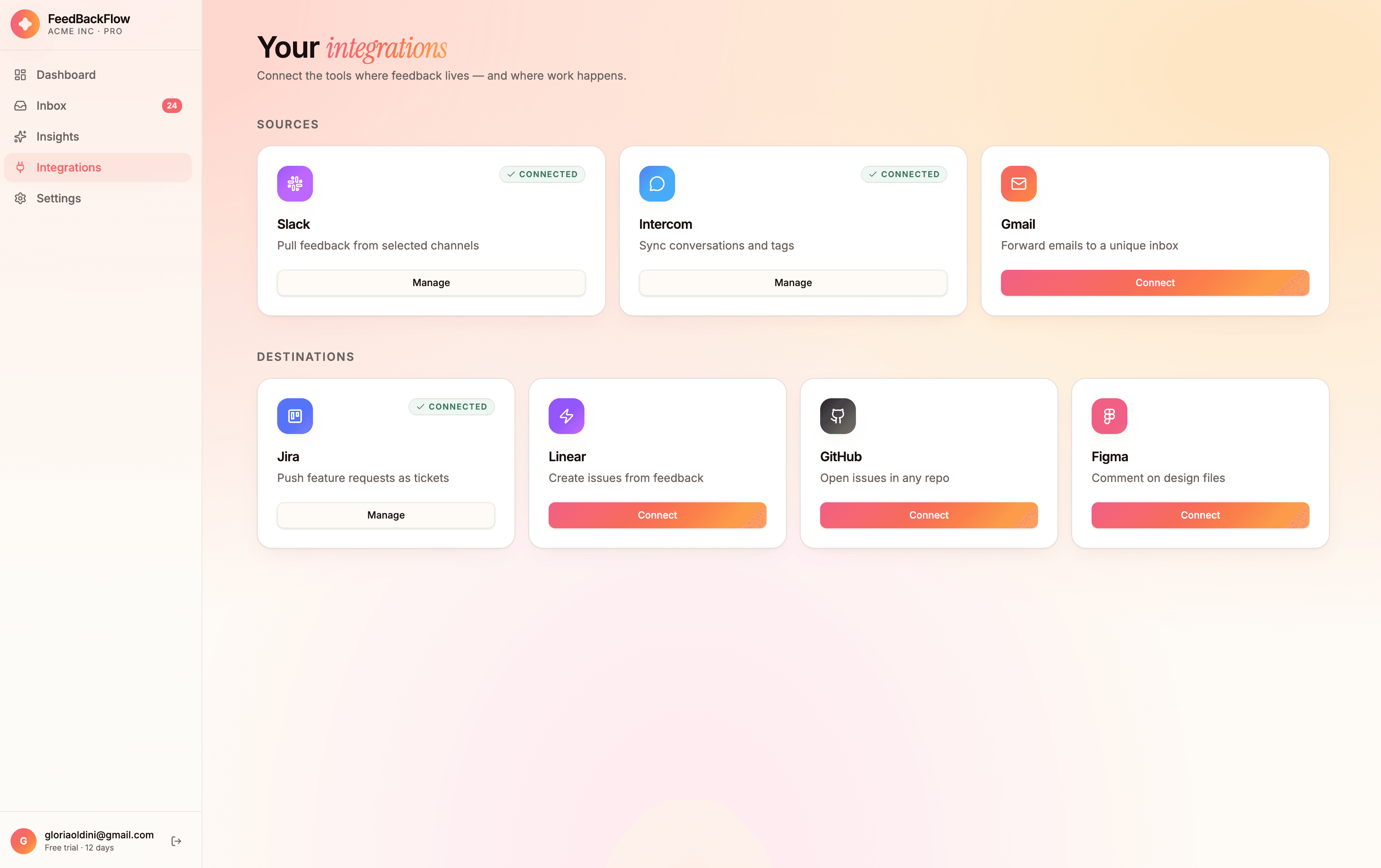
Choose where customer feedback already lives: Slack, Intercom, or Gmail. Connect at least one to start collecting signals right away.

02

Pick your topics

Select the topics that matter most, like bugs, pricing, or feature requests. FeedBackFlow uses these to auto-tag every incoming message.

03

You are all set!

We analyze your first batch of feedback the moment setup is complete. From here, it's straight into a live dashboard already full of insights.

01

Connect your first source

Choose where customer feedback already lives: Slack, Intercom, or Gmail. Connect at least one to start collecting signals right away.

02

Pick your topics

Select the topics that matter most, like bugs, pricing, or feature requests. FeedBackFlow uses these to auto-tag every incoming message.

03

You are all set!

We analyze your first batch of feedback the moment setup is complete. From here, it's straight into a live dashboard already full of insights.

01

Connect your first source

Choose where customer feedback already lives: Slack, Intercom, or Gmail. Connect at least one to start collecting signals right away.

02

Pick your topics

Select the topics that matter most, like bugs, pricing, or feature requests. FeedBackFlow uses these to auto-tag every incoming message.

03

You are all set!

We analyze your first batch of feedback the moment setup is complete. From here, it's straight into a live dashboard already full of insights.

What I Built

What I Built

The project is made up of two connected pieces: the marketing site and the product itself. The marketing site is a single page built to explain the product fast: what it does, who it's for, and what it costs. A bold hero states the value proposition in one line, live sentiment charts show the product in action before anyone signs up, and a simple three-tier pricing table closes the loop.

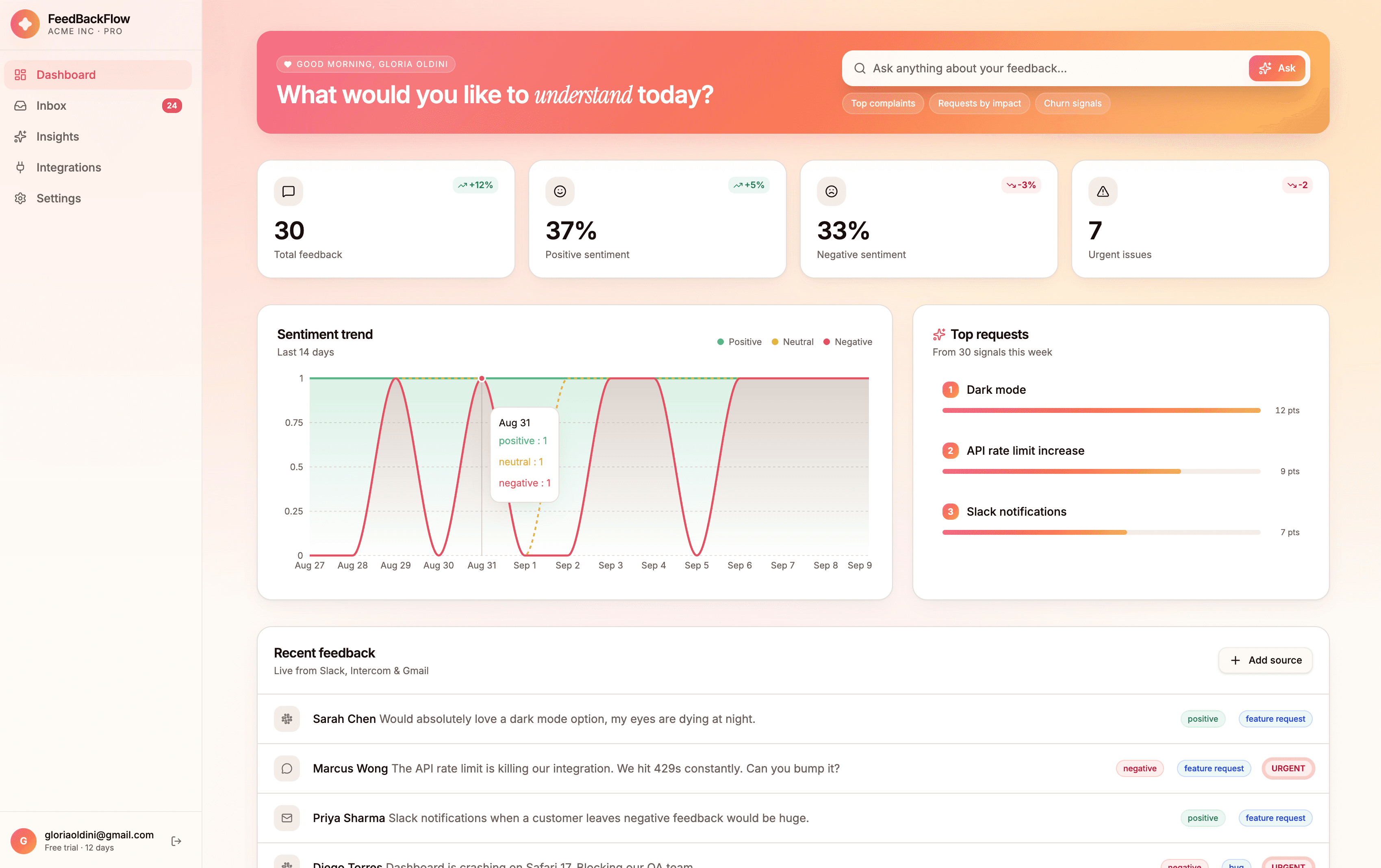
The product itself is where the daily value lives. The dashboard leads with an AI search bar so PMs can ask questions in plain language instead of hunting through charts. The inbox turns every piece of feedback into something actionable with AI-generated summaries and one-click export to Jira or Linear, while weekly Insights surfaces patterns and emerging themes across all connected sources.
Takeaways

Takeaways

This project pushed me to think about AI not as a feature, but as an interface layer. The best moments in the product are when the AI does something the user didn't have to ask for, surfacing a bug spike before it becomes a ticket, or flagging a feature that eight customers mentioned but nobody reported. Designing for that required thinking carefully about trust: how do you show AI output in a way that feels useful without feeling like a black box?